
|
Wolfhome Art FAQ Frequently Asked Questions |

|
|
Wolfhome is a two-dimensional graphical avatar chat, which allows for a unique visual element to portray yourself as your own virtual character in your own virtual habitat. These unique visual elements enable artists to create their own artwork to use as avatars or backgrounds, making Wolfhome an enriched artistic environment. Please use the directory below to help you find what you are looking for!  frequently asked misc questions |
||||||||||||||||||||||||
|
|
||||||||||||||||||||||||

|
What are poses, objects, & private rooms? (back to top) | |||||||||||||||||||||||
| |
Poses, also known as avatars, are images that represent you on chat. These images will be shown above your username. Wolfhome has a variety of different default pose sets that you can access through our Body Shop via the main chat page (most of which are free to use). If you would like to upload and use your own poses to better express yourself you can do so by visiting the Body Shop. Please note that to upload your own poses you will need to have a subscription. If you are wondering about how to upload poses, please check out the Pose Uploader Guide. Room objects are images that you can upload on to the site to use in your own private room. These images “pop out” from the background of the room. Room objects can be found in some of the public rooms as well. Some examples of room objects in the Wolfhome public rooms would be: the old music player in Emerald Jungle, the wooden sign in Silver Isles Sanctuary and the North Pole sign in the Icy Tundra. To upload room objects into your own private room you will need to have a subscription. A private room is a room that is owned personally by a community member of Wolfhome. These rooms do not appear in the public room list but in their own separate section at the bottom of the Mysts. In a user’s private room, the room owner can set their own room rating and rules for their guests to abide by. To upload and use a private room you will need to have a subscription, but If you are wondering about how to upload private rooms, please check out the Room Uploader FAQ. |
|||||||||||||||||||||||
|
|
How do I change my pose? (back to top) | |||||||||||||||||||||||
| |
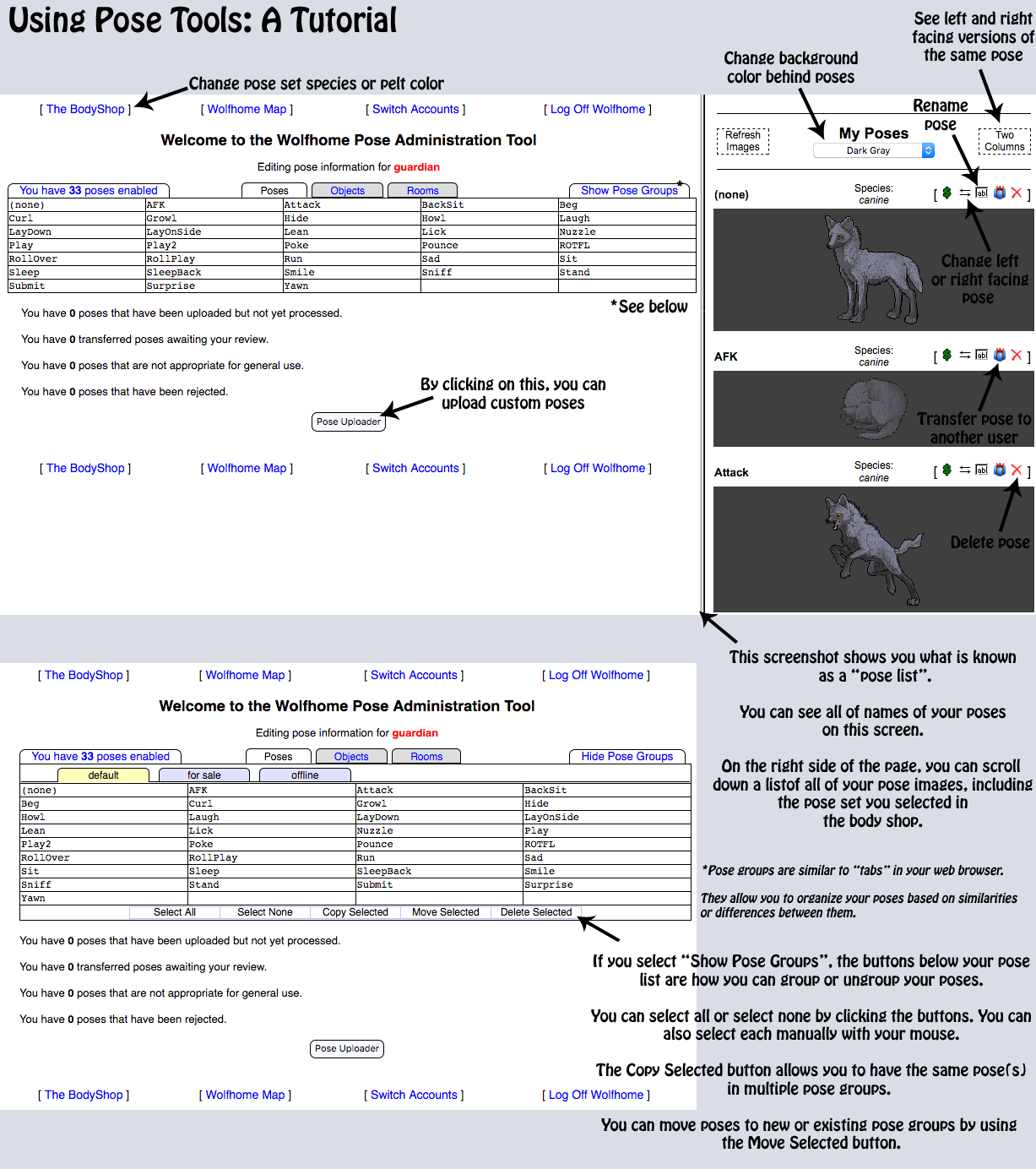
There are several ways to change the pose that you're in. The first method is by clicking your current pose. Once you do so, a box should pop up on your screen with a list of all your poses. From there, you can select a new pose from your pose list. You can also use chat commands to change poses! You can do so by typing "!pose posenamehere" into the textbox and hit enter. (For example: !pose sit). You could also use chat commands to change the way your pose is facing by typing "!face left" or "!face right" into the textbox. (Please note: typing "L" or "R" instead of left and right also works). To change the name of, delete, transfer, or regroup a pose on your pose list, please take a look at this tutorial we've provided for you! |
|||||||||||||||||||||||
| ||||||||||||||||||||||||
|
|
What do I put in the permissions section? (back to top) | |||||||||||||||||||||||
| |
Since we are a small, close knit community of artists, we have opted to provide more trust in our members during the uploading process. The requested information is as follows: When uploading a custom art piece that you own, you must provide us with the name of the artist, the type of transaction it is (commission, gift, trade, etc), and where you purchased/received it. You do not have to upload a link providing further evidence (unless credibility becomes compromised). If you are the artist, simply tell us that it is your art! Examples; “This is a custom pose I commissioned from [insert name here] on Wolfhome Forums.” or “This is a custom pose that was gifted to me from [insert name here] on Discord.” When uploading Freebie and Premade poses, links are generally required due to the nature in which we find these images to use. You may provide us with a direct link to the original artist’s topic or you may provide us with a screenshot showing the original artist post, permissions, or your receipt of payment. Please make sure the following information is showing on your screenshot when uploading proof of payment:
Please view a more in depth explanation & the Uploading Art Permission Policy Ladder & Restrictions |
|||||||||||||||||||||||
|
|
Body Shop? How do I access it? (back to top) | |||||||||||||||||||||||
| |
The Body Shop is where you can change your default pose/avatar colors. You can also upload custom poses, private rooms, and room objects from the Body Shop. Please note: to upload any custom artwork you will need to have a subscription. To access the Body Shop: Near the middle of the main Wolfhome map page you will see a small floating island titled, “The Bodyshop.” If you click on that island it will take you to the Body Shop. Additionally, you can find the Body Shop by clicking on “Map Links” on the far left menu on the Wolfhome map screen, and then select “The Bodyshop: Custom Colors”. |
|||||||||||||||||||||||
|
|
What are the species categories? (back to top) | |||||||||||||||||||||||
| |
There are 19 species categories on Wolfhome. The categories listed below are acceptable in all Wolfhome Rooms:
|
|||||||||||||||||||||||
|
|
How do I color my poses? (back to top) | |||||||||||||||||||||||
| |
First, you will need to pick a coloring program. Gimp, Pixlr, FireAlpaca, SAI and Adobe Photoshop are common favorites. Note - Gimp, Pixlr and FireAlpaca are Free. SAI and Photoshop you have to purchase. Second, please check out our Art Resources, Tutorials, and More! |
|||||||||||||||||||||||
|
|
What is the Wolfhome Forum? (back to top) | |||||||||||||||||||||||
| |
The Wolfhome Forum is where community members can post art, commissions, and characters as well as take part in fun forum games, share about their days, and talk with other members! Unlike the Wolfhome Chat, however, you must register for an account prior to being able to access the forum. The Forum Administrators will process your account within a few days of registration! Please remember, you may only have one account per person as per our Forum Rules. We highly recommend that you register for a forum account if you plan to upload artwork on Wolfhome. There are also many important discussions pertaining to Wolfhome that you can take part in on the forums including suggestions, rule change discussions, and more. Register today! | |||||||||||||||||||||||
|
|
How do I obtain a subscription? (back to top) | |||||||||||||||||||||||
| |
To get a subscription you will need to purchase the sites currency which is called Deltas. You can purchase Deltas through the menu on the left side of the Wolfhome map page (you must be logged in to do this). First select “My Account” and then “Purchase Deltas”. One (1) U.S. dollar is equivalent to one (1) delta on Wolfhome. There is a minimum purchase of ten (10) deltas at a time. Once you have purchased deltas for your account you can change your subscription level from “Free”, which is the default subscription, to a paying subscription by going to “My Account” on the Wolfhome map page and then selecting “Upgrade Subscription”. From there you can choose the subscription that best suits your needs. | |||||||||||||||||||||||
|
|
When will my poses & rooms be accepted? (back to top) | |||||||||||||||||||||||
| |
Artwork in the uploader is normally processed within 24 to 48 hours after being uploaded, depending on who is available at the time on the Art Review Team. They try their absolute hardest to make sure that artwork gets processed as soon as possible! If a pose takes longer than 72 hours, it is most likely being evaluated and is under discussion by the ART Members. If this is the case, make sure to check your e-mail that is associated with your chat account! An e-mail will be sent letting you know that your pose(s)/room(s) are under discussion. You are more than welcome to contact any current ART Member directly for further clarification. Happy uploading! | |||||||||||||||||||||||
|
|
What is ART & Who are they? (back to top) | |||||||||||||||||||||||
| |
Current Art Review Team Members!
A fun little fact: An abbreviation commonly used for the Art Review Team, is "ART". The ART's job is to review and process all artwork that are uploaded onto Wolfhome. They've been trained to either accept or reject submitted art based on our set guidelines, and to protect against all forms of Art Theft. All of the ART Members are real people who volunteer their time, besides their Administration duties, to handle anything in regards to submitting art or handling any necessary art discrepancies. They all deserve your respect and patience for their hard work! Keep in mind that if you ever have any questions or concerns that are solely art related, that they are more than willing to help and get back to you as soon as possible. |
|||||||||||||||||||||||
|
|
What is Art Theft & Character Theft? (back to top) | |||||||||||||||||||||||
| | The integrity and safety of our artists and members is our number one priority. Now that we are taking the artwork uploading process at its word, consequences for theft and TOS violations will be severe. So, what exactly is theft? Character Theft and Art Theft are similar in that it occurs when someone takes a character and or its art and claims, sells, traces, or uses it without legally owning it. If you did not design the character, you cannot claim to have made it. If you did not purchase or receive the character, you cannot use it. If you create a character that is too similar to an existing one by modifying a few details and claim it as your own, it is still considered theft. It is crucial to ensure that the characters and artwork that you use and create are not a copy of an already existing one. This will result in your inability to use the character on Wolfhome as well as a potential account ban, based on the severity of the violation. If you falsely claim ownership of artwork that was stolen, the pose will be rejected, you have committed art theft, and will therefore move up your ban ladder. We support the growth and development of our artists, but we do prohibit the copying, tracing, and heavy referencing of images without explicit permission or ownership of the original content. Some images are available for the very purpose of referencing and list permission to do so in the original listing; this would be acceptable permission for you to use based on the specific permissions given! However, if you are found to have committed any of the above listed thefts, you may also be restricted from providing art services on Wolfhome as well. If you have any further questions, concerns, or require clarification on a situation you fear may fall into these categories, please do not hesitate to reach out to Wolfhome Administration & Art Staff. We are here to help you and provide a safe environment for you to create! Art Ban Ladder
Art Probation If you are placed under an Art Probation you may not upload any artwork to any Wolfhome affiliated platforms (Forum, Chat, Wolfhome Community Discord) or you will move up your perspective ladder due to breaking your probationary period. |
|||||||||||||||||||||||
|
|
What is ART Harassment? (back to top) | |||||||||||||||||||||||
| |
ART Harassment refers to tormenting or pestering the Art Review Team. ART harassment can take different forms. Below are examples of ART harassment.
|
|||||||||||||||||||||||
|
|
How can I provide feedback? (back to top) | |||||||||||||||||||||||
| |
If you have feedback for the ART Staff, we would be more than grateful to hear it! Whether it's in regards to how we're doing, taking new suggestions, or constructive criticism, etc. Please keep in mind that we are all trying to make Wolfhome the best chat that it can be, and always looking to improve where it's required. All we ask is if you're giving us your thoughts, please do so politely and respectfully, even if it's criticism. There are a few ways that you can provide us with your feedback! You can post in our Suggestions section, submit an Anonymous Survey, or you can speak with any available ART Member about your ideas or opinions that can be brought up with the rest of the team. | |||||||||||||||||||||||
|
|
Can I use a Photograph as a pose? (back to top) | |||||||||||||||||||||||
| |
Unfortunately, photo images/photographs are not accepted on chat as poses. | |||||||||||||||||||||||
|
|
How do I turn off Animated Poses? (back to top)
Please refer to the Animated Poses rule, below "Pose Standards". |
|||||||||||||||||||||||
|
|
I have a question not listed here, what do I do? (back to top)
You may contact any Wolfhome Staff member through Chat or Forum. | |||||||||||||||||||||||
purpose for these requirements are to show what we require before uploading
|
||||||||||||||||||||||||
| ||||||||||||||||||||||||
|
File Type
(back to top) | |||||||||||||||||||||||
| We accept both GIF and PNG poses, with a maximum file size of 150 KB (153,600 bytes). Animated poses in the GIF or PNG format are also permitted, although they must be limited to 512 KB (512,000 bytes). Please note that poses with flashing lights, contrasting light and dark patterns, or any other visuals that may cause disorientation, discomfort, or illness are not allowed for general safety. For further information, please refer to the Animated Poses section. |
||||||||||||||||||||||||
|
Transparency & Loose Pixels (back to top) | |||||||||||||||||||||||
The background of a pose must be transparent, or "see through/invisible". To do this, some programs allow you to set the background as transparent prior to creating or coloring your pose, while other programs will require you to color the background of an the image a different color than what is already being used on the pose, if any. If you upload a pose with an opaque background, or if any of the colors within the pose are also transparent, it will not be acceptable.  Poses must never have any loose pixels outside the pose outline. Even 1 misplaced pixel is enough to have a pose rejected. In some cases, loose pixels can go along with the pose (such as fleas, ticks, smoke, glowing effects, noticing a loose pixel, etc). Only then will loose pixels be deemed acceptable. There must never be any holes or loose pixels inside the pose outline either. To check for loose pixels, it is helpful is place the pose over a dark background. This way, it makes it easier to see loose pixels for removal. You should test your pose on a few different dark colored backgrounds!   |
||||||||||||||||||||||||
|
Mirroring (back to top) | |||||||||||||||||||||||
All poses uploaded on Chat, must always be mirrored. Mirroring a pose is when you upload both a left and right facing pose. You simply have to 'flip' the pose in any art program & it does not need to be redrawn. By doing this, it allows you to "turn around" and face the opposite direction on chat. Another important note in regards to mirroring is when words are present on a pose (such as a shirt or a simple thought bubble); the words are encouraged to be mirrored on poses as well to remain legible. |
||||||||||||||||||||||||
|
Size Standards & Cropping (back to top) | |||||||||||||||||||||||
| Every pose uploaded to Wolfhome must meet our size requirements. These requirements are both physical pixel limits, as well as more subjective limits which take into consideration the avatar species and how the avatar is posed. If a pose is too large or too small, it will look unpleasant in our chat rooms. Poses must be at least 25 pixels in height and width. They can't be more than 600 pixels in height or in width. PLEASE NOTE: Images for most creatures (wolves, tigers, bears, etc) would be considerably smaller than the 600 pixel limit, and they would probably be less than 350 pixels in height / width. Different types of canines will vary in size - a dire wolf is much larger than a fennec fox. Also, though your pose is within the max size height, it may be proportionally too big. Make sure your pose isn't too bulky and other areas aren't too large, make sure your poses are well proportionate. If you are ever unsure and would like further clarification, feel free to contact any Member of the Art Review Team. The MAXIMUM pixel size is 600 by 600, but most species will be about half that, (at most 300 pixels in height or width). The MINIMUM pixel size is 25 by 25 and should be used for minuscule species like bugs, pixies, etc. If you're looking for various size charts of different species, please view here. Below are two commonly used size charts that show the more subjective limits of our Size Requirements: |
||||||||||||||||||||||||
|
||||||||||||||||||||||||
|
Outlines (back to top) | |||||||||||||||||||||||
| If outlines around a pose are present, they must always be complete, unless they are part of a puzzle pose that requires two halves to make a complete outline. Below are some guidelines to follow that show Acceptable VS Unacceptable Outlines. NOTE: All flat colored (not shaded) poses must have an outline. Sticker poses, otherwise known as poses with a thick/bold outline are also not allowed, and will be rejected. Neon outlines are also unacceptable. Examples will be included below. Acceptable Outlines
Unacceptable Outlines
Acceptable Outline Examples:    Unacceptable Outline Examples:     |
||||||||||||||||||||||||
| ||||||||||||||||||||||||
purpose for these standards are mainly used to educate on acceptable quality of poses
|
||||||||||||||||||||||||
| ||||||||||||||||||||||||
|
Shading & Highlighting
(back to top) | |||||||||||||||||||||||
| Poses do not require shading or highlights to be acceptable on Chat, however, there are certain guidelines to follow when uploading poses with & without these elements. If you're uploading a flat colored pose with no shading, it must have a solid outline. This means that if your flat colored pose you're uploading has no outline, pieces missing out of the outline, or loose pixels, then the pose will not be able to be used on chat. Additionally, we have some tips & suggestions for those who want to have shading in their pose(s):
|
||||||||||||||||||||||||
|
Color Schemes
(back to top) | |||||||||||||||||||||||
Poses are allowed to be a solid color & have a variety of markings from different species, however, please keep in mind that markings should flow with the anatomy of your pose and not appear "blocked" on. Pasting a gradient will also not be acceptable. Please keep in mind that your pose has to still be visible. Using very dark colors (solid black) or having an overly neon glow makes it difficult to distinguish and in some cases impossible to see the anatomy. If you are ever unsure on your color scheme in your pose, please feel free to reach out to an ART member for assistance!  |
||||||||||||||||||||||||
|
Modifications (back to top) |
|||||||||||||||||||||||
Each pose on Wolfhome must appear at least 80% of an acceptable species. Usually up to two major modifications are acceptable. If it is an extreme modification, where it is difficult to determine if there is still any remaining acceptable species in the pose, it normally isn't acceptable in the regular species categories. There are many modifications that are unacceptable and will be placed in different categories, such as the mythical category. Some examples are as follows:
|
||||||||||||||||||||||||
purpose for these standards are to show any additional rules on poses
|
||||||||||||||||||||||||
| ||||||||||||||||||||||||
|
18+ Rule & Mature Content (back to top) |
|||||||||||||||||||||||
| Wolfhome is a 18+ community & platform, and therefore everything said, linked & uploaded must follow the guidelines listed below. ✅ Allowed in Public Rooms:
|
||||||||||||||||||||||||
|
Offensive Material
(back to top) |
|||||||||||||||||||||||
| Any offensive material, artwork, or anything along those lines will not be accepted or tolerated on Wolfhome. This includes, but is not limited to, hate symbols, propaganda, obscene gestures, urinating or defecating poses that actually show urine or feces (that isn't in small amounts and with playful intent & is not "in the act" as long as it's not realistic). However, these are judged by a case-by-case basis. If you are ever unsure if the artwork you're uploading may contain offensive material, then please reach out to a Member of the Art Review Team who would be happy to help answer any questions you may have. |
||||||||||||||||||||||||
|
Blood & Gore
(back to top) |
|||||||||||||||||||||||
| Blood & Gore poses are not allowed to be used in public rooms on Wolfhome. These poses would be placed specifically within the "undead or gore" pose category. These poses are placed within this category as they are only allowed to be used in Private Rooms. The only exception to this rule is during the Halloween season specifically from October 1st to November 1st every year, they will be allowed to be used in Public Rooms during this time. Please keep in mind, poses that depict deceased or harmed animals in a prey stance are to be accepted into the gore category. It must fall within a natural predator/prey interaction. A feral animal holding a dead animal as means for Role-Play (killing animals for prey) or a feral animal chasing an injured animal (natural predator/prey interaction) would be allowed. However, there are a few exceptions that will not be allowed. If you are ever unsure before submitting, please reach out to an ART member. ❌Not allowed on Wolfhome (Anywhere, Even in Private Rooms):
|
||||||||||||||||||||||||
|
Props & Plushies (back to top) |
|||||||||||||||||||||||
| Props are items or animals that accompany your custom pose/avatar on chat. Most props are acceptable, including weapons, as long as they aren't in the motion of a violent act (slashing a sword, firing a gun, or pointing a gun directly at someone). Guns can be holstered, pointing up, down, or basically a relaxed manner. Joking guns, such as a water gun, are completely acceptable. If a prop is deemed too large, for example a couch or any large appendages such as tails/wings/etc that are more than 2x the size of the body, will be placed in the Large Prop Category. Examples of Acceptable Props: Signs, Plushies, Pets, Mounts, Simple thought bubbles, or any 18+ appropriate item. Examples of Unacceptable Props: Pets or mounts which are the same species of the main character of the pose (such as a wolf riding on a wolf mount); If the species is the same as the main character the additional pet will need to be in plushie form, Large vehicles or house hold items such as couches, Weapons that are being used in a threatening manner, Large/Medium speech bubbles, or Any inappropriate item that would be deemed above a 18+ rating. Plushies, however, are the stuffed animal equivalent for poses. You are allowed to either be a plushie, or have plushies present in your poses. The easiest way to show that a plushie is present in a pose is by adding stitches, though is no longer required. There is no limit on the number of plushies allowed within a single pose. These examples below are the most common reasons why a plushie pose is rejected or placed into the "Large Prop" pose category – other reasons will be dealt with on a case-by-case basis. A couple reasons why your plushie pose may be rejected:
|
||||||||||||||||||||||||
|
Pets, Mounts & Companions (back to top) |
|||||||||||||||||||||||
| Pets are companion animals that are present in a pose with your main character. Pet, Mount & Companion Poses are acceptable. Poses that depict the same species are now acceptable to be used on Wolfhome. These poses include a Feral or Anthro character, accompanied by animal companion(s) of the same species. Companion poses must be same size or smaller than a standard feral wolf according to our size charts. Oversized companion(s) that take away the focus of the main character may be placed into the large prop category, for example a Dragon companion to a Dragon OC. If there are small feral companions that are overtly larger than the Feral/Anthro character or Anthro Characters accompanied by an Anthro Companion, they will be rejected. Regarding mounts, any companion in motion or when a character is sitting on it, will be considered a mount pose. Examples below will be judged also by a case-by-case basis & discussed among the ART members. ✅ Acceptable Pets, Mounts & Companions:
|
||||||||||||||||||||||||
|
Gag & Mini Poses
(back to top) |
|||||||||||||||||||||||
| Gag poses are otherwise known as "joke/silly poses". These types of poses are meant to be drawn with simplicity and/or poor aesthetic quality. Gag and Mini poses require minimal shading, quality, highlighting, and even anatomy. All other art standards still apply. Occasionally, we will reject a gag pose for simply not being able to determine what the pose is meant to be. | ||||||||||||||||||||||||
|
Copyright Characters
(back to top) |
|||||||||||||||||||||||
| We have updated our policy to allow poses and rooms that feature copyrighted characters or works. This includes cosplay, plushies, and hand drawn illustrations of copyrighted characters. Please be aware that, despite this recent change, you are still required to have explicit, personal permission to use any of the artwork you upload. This means that the artwork you use featuring these characters must be original artwork that you own or have been given explicit permission to use from its original creator or source. | ||||||||||||||||||||||||
|
Animated Poses
(back to top) |
|||||||||||||||||||||||
|
Assembled based on guideline ideas & Art Examples & recommendations by Pit We allow animated poses that use the file types GIF or PNG. Animation frames are only limited to our 512 KB (512,000 bytes) size restriction. As stated above, all poses uploaded as GIFs or animations must have a clean, solid outline. When creating animated poses, it is crucial to keep in mind the safety of other members who will also be viewing your images. It is best to avoid using flashing lights, bright colors, quick movements, contrasting patterns, or movements that could potentially trigger seizures or other health issues. Additionally, it is important to ensure that the poses are of high quality on both sides and do not move too quickly. An animated pose will be evaluated based on size, how many elements are moving, and the number of frames being used in addition to our general pose requirements. Please note that any sexually suggestive animated poses will only be acceptable under the Mature category and are still subject to our 18+ Rule & Mature Content. Below are some additional guidelines you can follow to ensure your animated poses are acceptable. Flashing Lights & Colors Avoid using flashing lights or colors as they can trigger seizures in users who have epilepsy. These types of poses will be automatically rejected. To prevent this, allow time between stillness or movement and flashes. The number of frames in the flash should be sufficient to prevent any potential harm to the eyes. Avoid using excessively bright colors and refrain from frequently switching between them. Animation Speed & Amount of Movement It is important to consider the size of the movement or animation itself, as well as how long the animation lasts and when it loops. As smaller poses are already less conspicuous, they are not likely to cause any major problems when in motion. Partial body movements (eye blinking, ear flicking, tail wagging) are less noticeable and generally not harmful when moving at a slow rate. When looking at a pose with full body movement, it is essential to consider the size and any potential lasting effects the animated features may have. It is important to find a balance between these elements to ensure a well-rounded animation. Determining the FPS (Frames Per Second) of a pose can be difficult due to the number of frames and how they are arranged. For example, a pose could be 10 FPS, but if there are not many frames in the animation, the movement will appear quicker and snappier. In order to accurately assess an animation's speed and movement, additional criteria should be taken into account rather than relying solely on the FPS rate. We will evaluate your animation's speed based on:
Depending on which browser you're using, animated poses can be turned off. On this page from How-To Geek, please navigate to your corresponding browser to view instructions on how to disable animations. You may also view our Guide on the forum as well. Helpful Resources - Ezgif - Ezgif Help & FAQ This site is safe and efficient to use for altering and creating animated GIFs, allowing you to combine frames, adjust the animation speed, the size of the image, and flipping the image itself.
A free site to easily make GIFs transparent. Use a HEX Color Picker if the background of your pose is an off-color. ✅ Acceptable Animated Poses (small poses, quick movements):  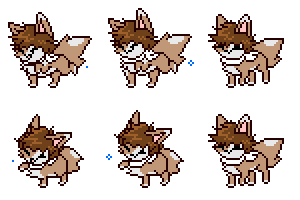 ✅ Animated poses with partial body movements: 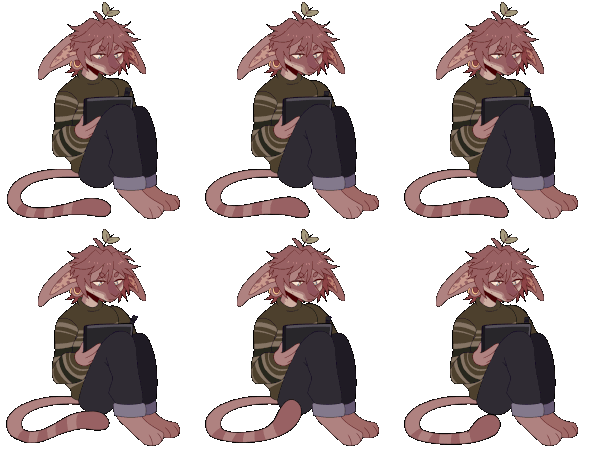 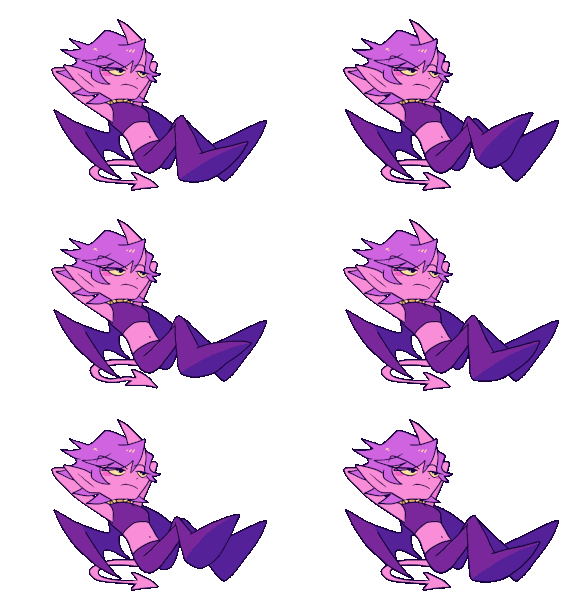 ✅ Animated poses using full body movement: 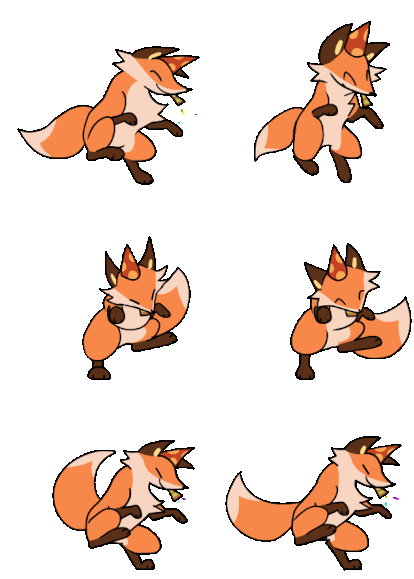 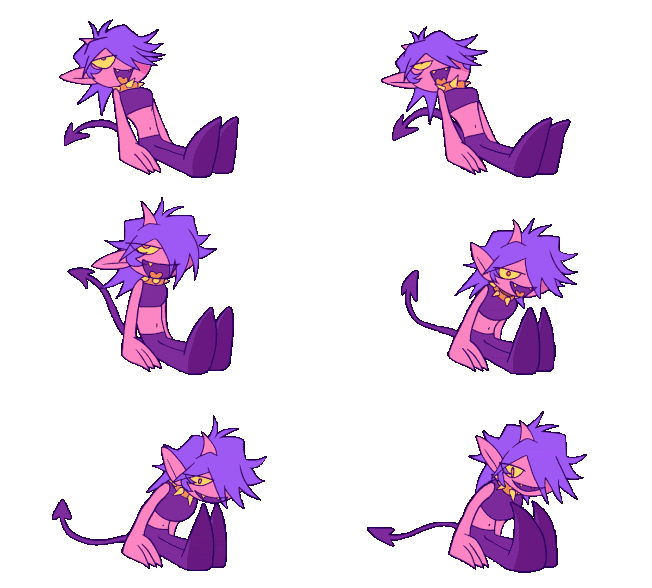 | ||||||||||||||||||||||||
|
Helpful Links
(back to top)
|
|||||||||||||||||||||||
|
|
|
|||||||||||||||||||||||


| [ Wolfhome FAQ ] | [ Wolfhome Rules ] | [ Terms of Use ] | [ The Art FAQ ] | [ Uploading Poses ] | [ Uploading Rooms ] | [ Close Window ] |